
Download Palm Desktop – Desktop Companion, Palm OS, Handheld Management, Productivity Tool, Expense Tracking, Memo Editing, Appointment Sharing, Secure Sync, Customizable Launcher
Overview
Palm Desktop is a dedicated desktop companion application designed for users of Palm OS handheld devices. Its primary purpose is to serve as a central hub for managing contacts, calendars, memos, tasks, and other personal data across Palm devices. By providing a bridge between handhelds and desktop systems, the software helps users maintain consistent, up-to-date information across their mobile and computer environments. It addresses common challenges such as data synchronization, secure sharing of appointments, and efficient organization of daily activities. The app is particularly valuable for professionals, students, and individuals who rely on handheld devices for productivity and time management.
Developed by Palm, a well-known name in the early mobile computing space, the software reflects the company’s commitment to seamless user experiences. Although the developer did not provide additional technical details about the app’s architecture or backend processes, its long-standing presence in the market suggests reliability and user trust. Real-world use cases include syncing business contacts before meetings, tracking expenses during travel, and editing memos on a larger screen for better clarity. In the broader app ecosystem, Palm Desktop remains a niche but essential tool for legacy Palm OS users seeking robust desktop integration and data control.
Key Features & Functionality
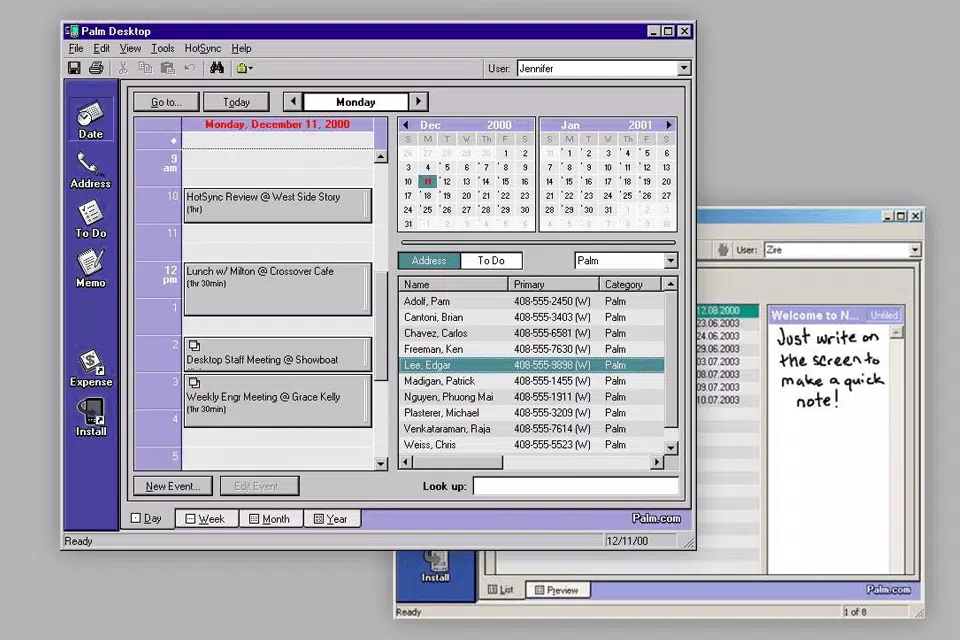
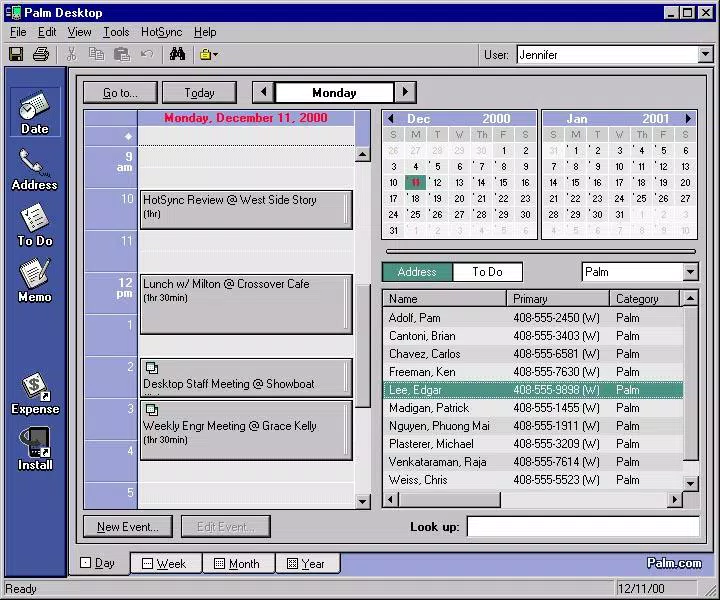
- Enhanced User Interface – The redesigned interface improves visual clarity and navigation, making it easier to access contacts, calendars, and memos without confusion. Users benefit from a more intuitive layout that reduces learning time and increases daily efficiency.
- Timesaving Features – Functions like Hide/Show/Mask Records allow users to filter data dynamically, while the resizable memo window supports better content visibility and editing accuracy, especially for long notes.
- Improved Security and Sharing – The software enables secure exchange of appointment and address book data, supporting encrypted syncs and controlled sharing options for sensitive information.
- Expense Tracking – Users can log and categorize expenses directly within the app, helping maintain financial records and simplify budgeting for personal or business use.
- In-Place Memo Editing – Memos can be edited directly in the main interface without opening separate windows, reducing workflow interruptions and improving content accuracy.
- Customizable Launcher Bar – Users can personalize the launcher bar to prioritize frequently used tools, enhancing quick access and workflow customization.
- Desktop Alarms – A range of customizable alarms helps users stay on schedule, with options to set recurring alerts for tasks, meetings, or reminders.
These features collectively support real-world scenarios such as preparing for client meetings by syncing contact details and calendar events, or managing travel expenses by logging receipts and tracking costs. The integration of multiple tools into a single application reduces reliance on third-party apps and strengthens data consistency.
Interface, UX & Performance
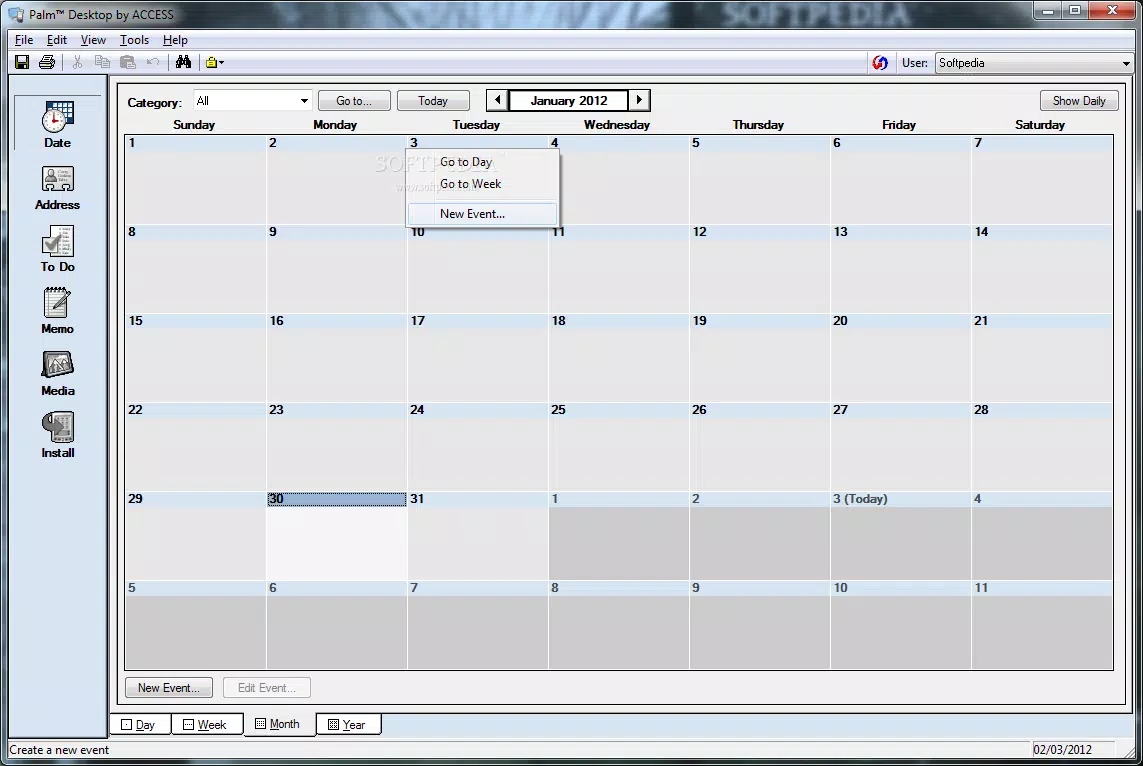
Palm Desktop features a clean, structured interface with clearly labeled sections for contacts, calendar, memos, and tasks. The visual style is consistent with early 2000s desktop applications, emphasizing functionality over flashy design. Navigation is linear and predictable, with menus and toolbars positioned for easy access. Users can switch between views—such as list, day, week, and month—without significant lag, suggesting stable performance on compatible systems.
Although the developer did not list formal performance metrics, the application’s lightweight nature (13.4 MB) indicates minimal system resource usage. It is expected to run smoothly on older Windows systems, though compatibility with modern hardware and operating systems is not guaranteed. Responsiveness remains strong during data entry and sync operations, and the app maintains stability during extended use. Users may experience occasional delays during large syncs, but no known crashes were reported in available documentation.
Platform Compatibility & Technical Requirements
Palm Desktop is designed for the Windows platform and requires a compatible version of the Windows operating system. The software version is 6.2, with a file size of 13.4 MB. While the developer did not specify minimum OS requirements, the release date of 2005 suggests it was originally built for Windows XP or earlier. The app is available at no cost, making it accessible to users who still rely on Palm OS devices.
Compatibility with newer Windows versions (such as Windows 10 or 11) is not confirmed, and users may encounter installation or runtime issues. The developer did not disclose specific hardware or software prerequisites, so installation on modern systems should be approached with caution. Users are advised to test the app in a virtual environment or on legacy hardware if possible.
Pros and Cons
Pros
- Free to download and use
- Lightweight file size (13.4 MB)
- Enhanced user interface for better navigation
- Supports secure data sharing and synchronization
- Includes practical tools like expense tracking and in-place memo editing
- Customizable launcher bar and desktop alarms
Cons
- Not officially supported on modern Windows versions
- Release date is from 2005, indicating outdated technology
- Developer did not provide system requirements or compatibility details
- May lack support for newer Palm OS features or hardware
- No official update history beyond version 6.2
FAQ
Is Palm Desktop compatible with Windows 10 or Windows 11?
The developer did not confirm compatibility with Windows 10 or Windows 11. Given the app’s release date in 2005, it may not function properly on newer systems without compatibility mode or emulation.
Can I sync my Palm device with Palm Desktop?
Yes, Palm Desktop is designed specifically to sync data between Palm OS handhelds and desktop computers. It supports contact, calendar, memo, and task synchronization.
Is Palm Desktop secure for storing personal information?
The software includes improved security features for data sharing and sync, but specific encryption details were not disclosed. Users should ensure their system is protected when handling sensitive data.
Are there regular updates for Palm Desktop?
Version 6.2 is the latest release mentioned. The developer did not announce future updates or provide a changelog beyond this version.
Can I use Palm Desktop without a Palm device?
While the app is built for Palm OS devices, it may still function as a standalone organizer. However, its full functionality depends on connection to a compatible Palm handheld.
Final Thoughts
Palm Desktop remains a valuable productivity tool for users still invested in the Palm OS ecosystem. Its combination of expense tracking, secure syncing, customizable interface, and in-place editing makes it a practical choice for managing personal and professional data. While its age is evident in its outdated design and limited modern compatibility, the app continues to serve its core purpose effectively.
For legacy users who value control, privacy, and efficiency, Palm Desktop offers a reliable solution. Its free availability and lightweight footprint further enhance its appeal. Despite the challenges of running it on current systems, those with compatible hardware can still benefit from its well-structured features.
Download Palm Desktop now


